
Trae AI IDE: ByteDance's Enhanced Development Solution
January 23, 2025
Trae
ByteDance
AI IDE
Software Development
Code Assistance
Project Management
Trae, an AI-powered Integrated Development Environment (IDE) by ByteDance, offers developers a range of intelligent features to enhance coding efficiency and project management.
Trae AI IDE: ByteDance's Answer to Faster Development
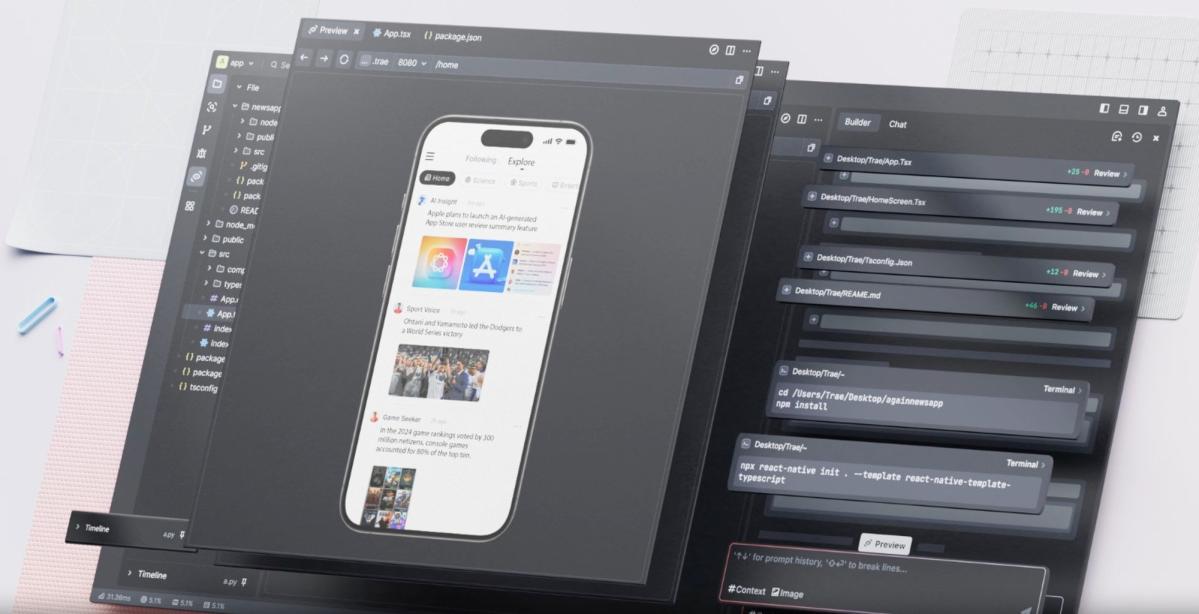
Trae, developed by ByteDance's Singapore subsidiary SPRING(SG)PTE.LTD, is a cutting-edge AI Integrated Development Environment (IDE) designed to enhance the efficiency and speed of software development. Here are some key features and benefits of Trae:
Key Features of Trae
- Intelligent Q&A and Assistance: Developers can chat with the AI assistant for help with code explanations, writing comments, fixing errors, or suggesting programming patterns, providing timely and effective support.
- Real-time Code Suggestions: The AI assistant can understand the current code logic and provide optimization suggestions in real time, improving code quality and reducing potential errors.
- Code Snippet Generation: Developers can describe their needs in natural language, and the AI assistant will quickly generate corresponding code snippets, even autonomously writing project-level code involving multiple files.
- Quick Project Building: In Builder mode, developers can inform the AI of the type of application they want to create, and it will automatically complete various tasks for project setup, including task breakdown, file creation or modification, and generating and running commands.
- Multimodal Interaction: Developers can upload images to express their needs, such as design sketches, reference styles, or error screenshots, and the AI can accurately understand the image content, enhancing development efficiency.
- Comprehensive IDE Features: It includes essential IDE functions such as code writing, project management, plugin management, and version control, providing a fully functional development environment.
- Efficient Code Completion: It can quickly and intelligently predict and complete code based on developers' input and code context, improving coding speed and reducing manual input workload.
Applicable Scenarios
- Web Application Development: Trae can generate front-end and back-end code for features like image upload, compression, preview, and download, and provide visual design suggestions.
- Tool Application Development: It can assist in creating tools for image processing, file format conversion, compression/decompression, JSON formatting, and more.
- Front-end Project Development: Trae can use React or other front-end frameworks to generate project files and achieve smooth animations and transitions.
- Game Development: It can generate game code, including game logic, interface rendering, and user interaction, for small games like Tower of Hanoi, Snake, or New Year’s Fortune.
- Assistance with Daily Programming Tasks: Developers can use Trae to understand code, optimize code structure, add new features, or fix errors, enhancing programming efficiency and quality.
Getting Started with Trae
To start using Trae, follow these steps:
- Visit the official Trae website (https://www.trae.ai) to download the desktop client for macOS (currently only the Mac version is available, with the Windows version expected to launch by the end of February).
- After installation, launch the program by clicking the Trae icon.
- On first launch, enter the settings interface to choose the theme (Dark, Light, or DeepBlue) and select the interface language (English or Simplified Chinese).
- Import settings from VSCode or Cursor if you have used these IDEs before.
- Optionally, install the trae command in your local terminal for command-line launches of Trae or opening projects.
- Log in to your Trae account using your GitHub, Google, or Trae account.
- Start developing projects by opening an existing folder or cloning an existing Git repository, or use the AI assistant to create a new project in Builder mode.
Conclusion
Trae brings a new programming experience for developers with its powerful AI capabilities, friendly support for Chinese developers, and rich applicable scenarios. Whether you are a professional developer or a programming novice, Trae can help improve development efficiency and quickly realize your ideas. Give it a try and share your experiences and suggestions to support its ongoing development.
Sources
Trae - Ship Faster with Trae
Ship Faster with Trae. Trae is an adaptive AI IDE that transforms how you work, collaborating with you to run faster. Download. Collaboration = You & Trae.
Breaking! Byte's New AI Programming Tool Trae is Here - AIbase
On January 20, 2025, ByteDance launched Trae (trae.ai), an AI programming tool designed for professional developers.
Trae AI IDE: ByteDance's Answer to Cursor - Vincent Schmalbach
What is Trae? Trae is a macOS-based IDE built as a VSCode fork that integrates AI capabilities throughout the development workflow. What ...
 Invite Gmail Contacts